
Examples of automation in the workplace
 Verified & Reviewed


 Copy Link
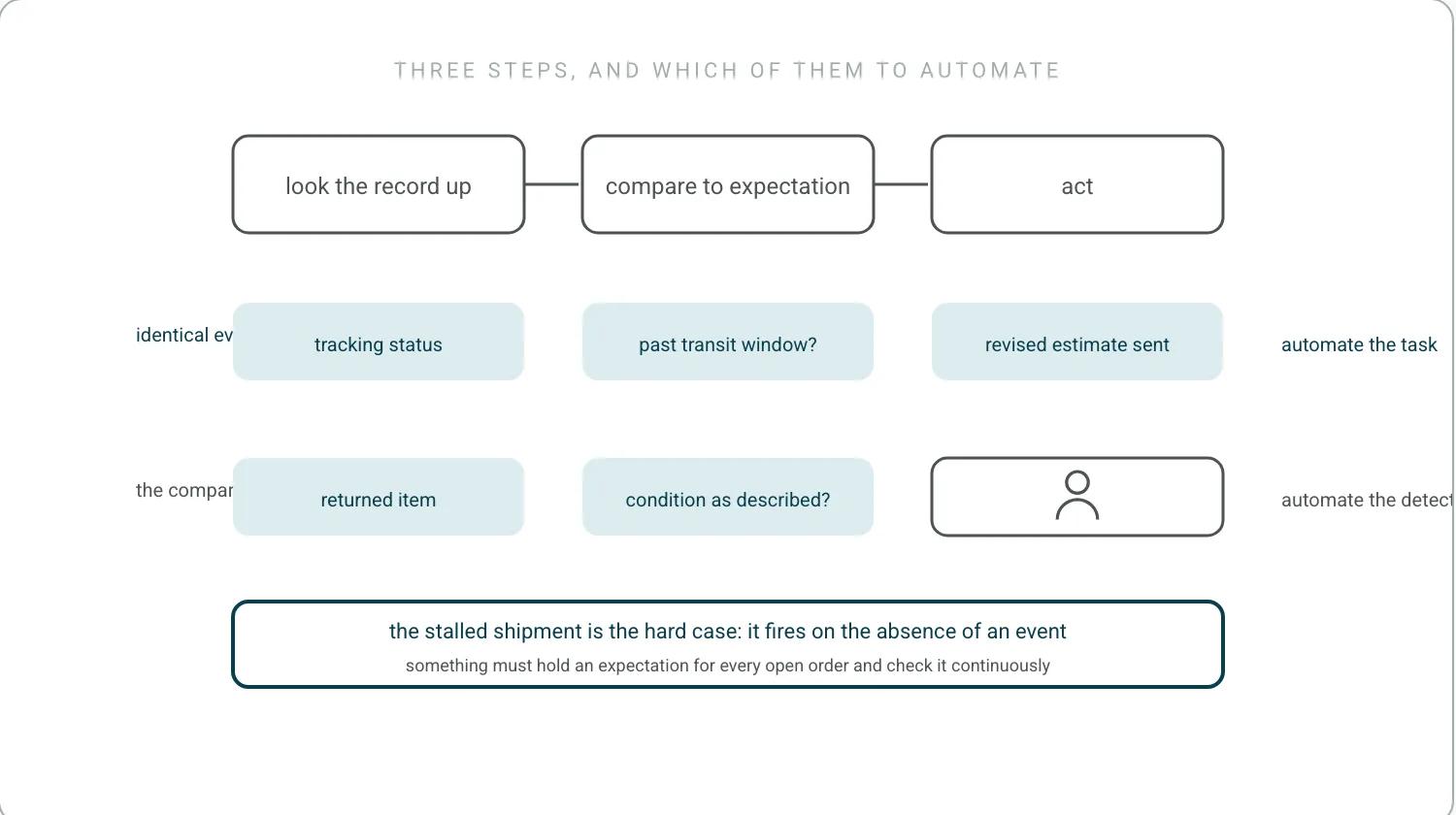
Workplace automation in an ecommerce operations team is the replacement of a repeated human decision with a rule that reads system state. The work it replaces is specific: looking a record up, comparing it against an expectation, and then writing a message or making a change. Automation is worth applying where all three of those steps are identical every time. Where the comparison requires judgment, the useful pattern is to automate the detection and leave the decision with a person, which is a different design from automating the whole task. The vocabulary for that distinction is settled in IEEE 2755, and the anatomy of a single rule is on automation examples in real life.
Three WISMO automations, and only the third one scales
Order status inquiries are the highest-volume repeated task in post-purchase support, and three automations address them. Proactive status notifications remove the reason to ask by sending the update at the moment the state changes. A self-service order lookup lets a customer answer the question themselves with an order number and an email address. The contact type all three are aimed at is WISMO. Delay alerts handle the case the other two miss, which is the order that has stopped moving and therefore generates no event to notify on. The three are not interchangeable. Notifications and lookup pages both assume the order is progressing normally, so a team that deploys only those still receives the contacts from every order that is genuinely late.
The three automations above are the right three and the honest framing is that only the third one scales. When we launched, we only believed in detection: the system would flag the broken order and the team would fix it by hand. Then we realized automation was the real one, and that is when we started building the actions. Teams I talk to now already know fixing these manually is not economically viable. I talked through that shift on eCommerce Australia, and the store-level version of the argument is automated ecommerce store.
Returns automate cleanly because every step has a status
The return sequence automates cleanly because each step has a defined status. A return authorization portal checks eligibility against the order date, the item, and the reason, issues a prepaid label, and records the expected return. Carrier scans then drive the customer-facing updates without an agent touching the case. The decision that matters is where the refund is released, since releasing on the outbound scan is faster for the customer and carries the risk of an item that never arrives or arrives in a different condition than described. The fast version is instant refunds, the slow version is bounded by the merchant's policy rather than by 16 CFR Part 435, which covers orders that never shipped, and the process around both is returns management. Exchanges add a second dependency, because the replacement has to be reserved against live stock at the moment the exchange is agreed rather than when the return is received.
When we roll an automated action out, teams start by saying they want to be involved in every one, and soon they are telling us to cut them out of it because they have got comfort.
Routing changes the outcome of the order, so a wrong rule costs most
Routing automation decides which location fulfills an order and whether the order should proceed at all. Rules typically consider stock availability by location, distance to the delivery address, carrier cut-off times, and the cost of splitting the order across sites. The settled terms for all of that are in the CSCMP supply chain glossary, and the system that holds the rules is the order management system. The same layer holds the holds: an address that fails validation, a billing and shipping mismatch flagged for review, or an order for an item whose available stock is committed elsewhere. Routing is worth separating from messaging in any automation inventory, because it is the one category where the automation changes the outcome of the order rather than describing it, and it is therefore also the category with the highest cost of a wrong rule.
It is also where I would stop complaints before they exist. If a parcel has not left the warehouse, catch it and push it out. If a payment fails, retry it. If a return is stuck, flag it for resolution. Fix the operations issue at the root and there is no complaint.
The stalled shipment fires on the absence of an event
Exception automation detects the orders that have left their expected path and acts before the customer notices. Address validation runs at checkout and catches the malformed or undeliverable address while the customer is still present to fix it, which is the only moment the fix is cheap. After dispatch the detectable exceptions are a carrier hold, a failed delivery attempt, a customs stop, and the harder case of a shipment that has simply stopped scanning, which is the state a USPS Missing Mail search eventually formalizes and which nobody wants to reach. That last one cannot be triggered by an event, because no event occurs. It has to be derived by comparing elapsed time against the expected transit time for that lane, which needs a real reference rather than a guess: USPS publishes its service standards and its performance against them. Joining several carriers' versions of that is carrier integration, which is why stalled shipments are the exception category most often left uncovered.
The stalled shipment is the hard case on that list. The misconception I hear most is that a late order is a carrier problem. Mostly it is everything upstream: is Shopify syncing correctly, is the inventory allocated correctly, is the payment system working, is the warehouse shipping on time. Every other automation on this page fires on an event. This one has to fire on the absence of an event, which means something must hold an expectation for every open order and check it continuously, rather than waiting to be told. That is a different architecture, not a harder rule, and it is the reason most workplace-automation catalogs stop at the categories where a webhook exists. What watching every open order continuously looks like as a product is parcel software and as an operating model is proactive customer service. A promise breaking produces no notification. Every order is a promise. Keeyu keeps it.
Two entries from the 786 pain points we mined from 270 customer call transcripts between May 2025 and May 2026 show what the absence looks like from the inside. Silent connection failures stopped data syncing for weeks at a time with nobody aware of the gap, and 3PLs quietly prioritized new orders over the backlog, so the unshipped batches sat until somebody chased them by hand. In neither case did any system the merchant owned produce an event.
Helpdesk automation works on the ticket, not the order
Helpdesk automation works on the contacts that still arrive. Classification assigns an intent to an incoming message so that it can be routed, prioritized, and counted, and the counting is the part with lasting value, because reason codes are what tell an operations team which upstream problem to fix. Routing sends the case to the queue with the right permissions, and macros answer the standardized cases directly. The limit of this layer is that it works on the ticket rather than on the order. A helpdesk automation can classify twenty messages about the same delayed shipment correctly and none of them is resolved until something changes the shipment. The tooling layer is the automated ticketing system, the system itself is the helpdesk, and the argument about its limit is on complaint resolution process. The operating model is post-purchase operations.
The best customer service is the kind the shopper never needs, because everything in the back end just works. That is why we link work to the customer promise instead of a ticket: the promise shows the root cause, which an automation can fix before the shopper reaches out.
Frequently Asked Questions
What are examples of office automation?
In an ecommerce operations team the repeated tasks worth automating are specific: order-status notification and lookup, delay alerts for orders that have stopped moving, return authorization and label issue, order routing and holds, address validation at checkout, and helpdesk classification. Each replaces the same three steps, which are looking a record up, comparing it against an expectation, and writing a message or making a change.
Can you give me an example of business automation?
The one worth building first is exception detection: something that holds an expectation for every open order and raises the ones that have stopped progressing. It is the only item on the list that fires on the absence of an event rather than on an event, which is why most catalogs leave it out and why it is where the support volume actually comes from.
Can you give me some examples of automation software?
The category matters less than where the rule runs. A helpdesk automates the conversation. A messaging platform automates the send. An operations layer works on the order itself. Comparing them on feature lists hides the difference, and the test that exposes it is whether the tool can change an order or only describe it.
References
- IEEE. IEEE 2755. Automating detection against automating the decision.
- US Electronic Code of Federal Regulations. 16 CFR Part 435. Refund timing for orders that never shipped, not returns.
- Council of Supply Chain Management Professionals. CSCMP supply chain glossary. Settled definitions for routing and allocation.
- United States Postal Service. USPS Missing Mail search. The formal end state of a shipment that stopped scanning.
- United States Postal Service. USPS publishes its service standards and its performance against them. A real reference for expected transit time.
Keep the promise.
See how Keeyu catches and fixes post-purchase issues before customers notice.
In one call, we’ll map your operations and show how Keeyu detects issues, decides what needs to happen, and takes action across your existing systems.
We’ll confirm your integration requirements and rollout plan during the demo.
