
Shipping notifications: what to send, when, and what to say when it breaks
 Verified & Reviewed


 Copy Link
Shipping notifications are the automated messages that track an order's journey to the customer: confirmed, shipped, out for delivery, delivered, and the ones in between. In my experience, "where is my order", exchange, and return queries account for around half of all support tickets, and a decent notification cadence deflects the share of those where nothing is actually wrong. The rule I run every brand on, and the standard this whole page applies: fix the issue before the customer even asks "where is my order", and when you cannot fix it first, tell them first. Every time. Every order is a promise. Keeyu keeps it, and a notification is the promise talking to the customer while it is being kept. This page is the playbook: the milestones, the channels, and the messages that matter when things break, which is where proactive e-commerce operations, the system of action for e-commerce, earns its name.
The milestone set worth sending
- Order confirmed. Instant, with the delivery promise restated exactly as checkout showed it. This message sets the standard you will be held to.
- Shipped, with tracking. The workhorse. Send it on a real carrier scan, not on label creation, or you are teaching customers that your messages lie.
- Out for delivery. The one customers act on: someone checks the porch, moves the meeting. SMS earns its keep here.
- Delivered. Confirmation plus the next-step path if something is wrong, which quietly deflects the "it says delivered but" ticket.
- The delay notice. The milestone most stores never send, and the only one that builds real trust. If a promise is drifting, say so first, with a new date and what you are doing about it.
Channel split: email carries the record, SMS carries urgency, and the wider automation picture is on the customer service automation page. Send SMS for out-for-delivery and delays, email for everything, and never SMS a milestone the customer cannot act on.
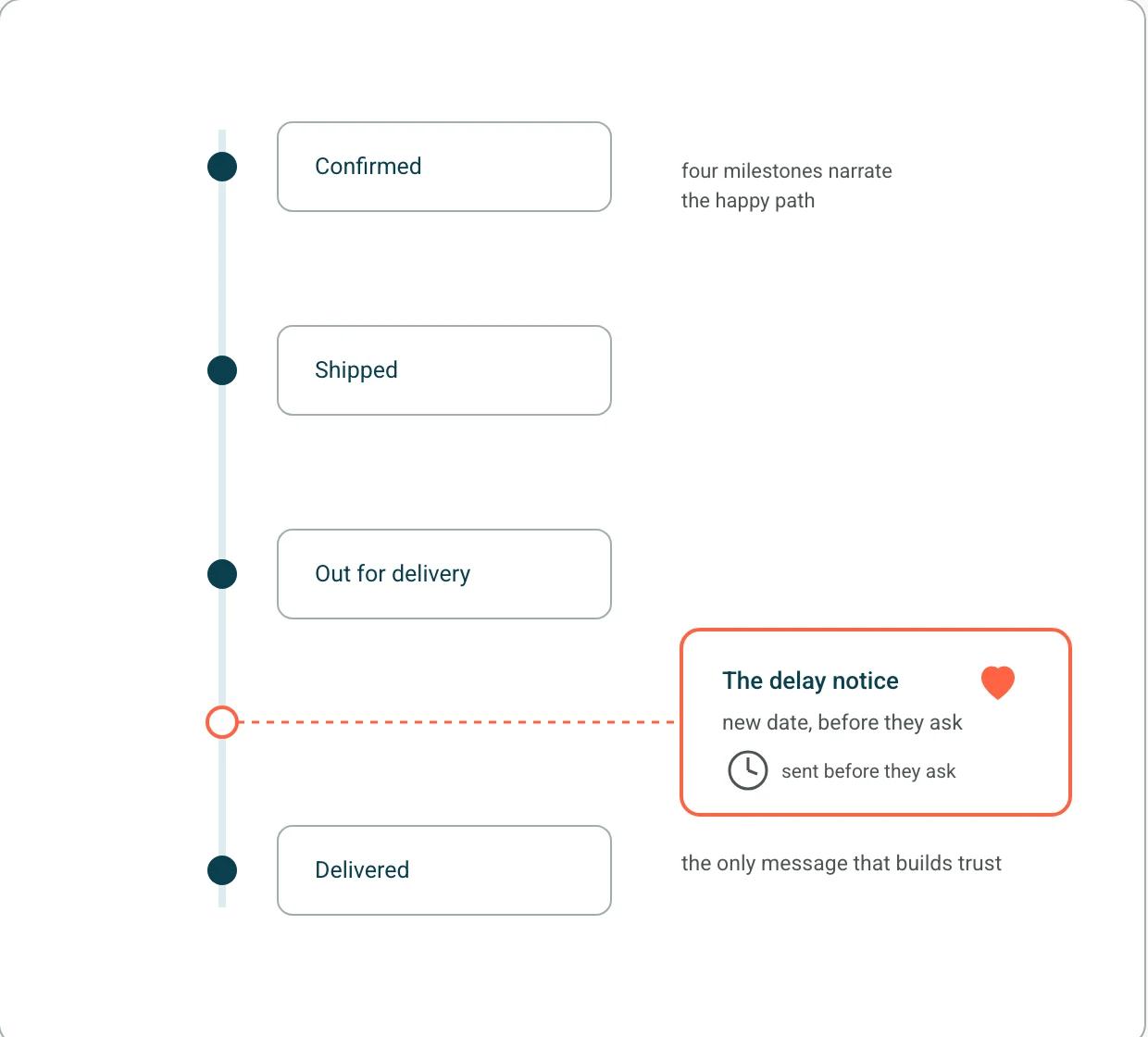
The milestone set is only as good as the promise behind it. We define ours as order before twelve, pay for express, ships same day, arrives tomorrow, then work backwards along every touchpoint against it, which I described on Add To Cart. Send milestones against a promise you can compute and each one confirms something. Send them against a guess and they are just noise with a tracking number attached.
The delay message: the template that matters
Three ready-to-use versions, by scenario, are on the delivery delay templates page.
Three sentences, in this order: we know. Here is the new date. Here is what we are doing about it. That is the whole template, and every word of padding weakens it. What makes it hard is not the copy, it is the trigger: sending this message requires knowing about the delay before the customer does, which is an operations capability, not an email one. This is the line between notification tooling and the layer underneath it, and it is why the delay notice is the milestone that separates brands that narrate from brands that keep promises. The software landscape for the sending side is on the delivery notification software page. The detection side, knowing which orders are drifting off promise, is the on-time delivery discipline.
The part that still surprises me: it is not the delay that kills the customer relationship, it is the silence. Clutch Glue had the same realization. Its team used to spot delays only after a customer complained, and the moment they could see what was happening in real time, they stopped scrambling and started getting ahead of the conversation. The win was not just visibility, it was acting on it before the customer even had to ask.
Notifications matter just as much on the reverse leg: a customer waiting on a refund is a customer waiting on a promise, which the returns management page covers.
Customer communication templates for when an order breaks
Customer communication in ecommerce is every exchange between a store and its shoppers: the messages it sends across the order lifecycle (confirmation, shipping, delays, delivery, returns) and the answers it gives when shoppers write in, by email, SMS, chat or phone. Proactive customer communication is the subset sent before the shopper gets in touch, triggered by a detected event rather than a status label.
Every template below exists because something upstream slipped: a stock count, an address, a pick. When the shopper writes in first, the ticket is the report that a promise broke before anyone on the team saw it. Help desks like Gorgias and Zendesk handle that reaction well, and we integrate with both, but the order that never becomes a ticket is the one operations caught first. Helpdesk manages complaints. Keeyu prevents them. So my first rule: only promise what operations can detect. A template with no detector behind it never fires on time.
Teams stay reactive because writing these messages one by one is manual, repetitive and expensive in hours, so outbound work is the first thing dropped when tickets pile up. The way out is upstream as well: tie each message to an event operations already detects, so the copy fills itself from the order data instead of from an agent's afternoon.
Event | How operations detects it | One ask in the message | Channel |
|---|---|---|---|
Delay before dispatch | Order not picked by its ship-by time | Accept the new date or cancel | Email; SMS if the new date is within 48 hours |
Address problem | Address validation fails, or the carrier flags it before dispatch | Confirm or correct by a cutoff | Email and SMS |
Stockout after purchase | Allocation fails against the order line | Choose: wait, ship from elsewhere or refund | |
Partial shipment | Shipped lines fewer than ordered lines | None; state the second ship date | Email with both tracking links |
Four rules sit behind every row. Name the detector before you write the copy. One message, one ask. Give a date or a consequence, never "soon". And send it even when the miss is small: we tell shoppers about a parcel stalled in transit even if it will only arrive one day late, because the shopper measures you against the promise date. Every order is a promise. Keeyu keeps it.
Delay copy is in the section above. The other three:
Address problem
An address problem is a delivery that will fail unless the shopper acts before dispatch. Caught when the shopper types it at checkout, it never needs this email, which is why validation belongs upstream of the copy.
Subject: Quick check on your delivery address for order {order_number} "Hi {first_name}, before we ship order {order_number}: the address we have is {address_line}, and {issue}. Reply with the correct address or confirm it at {confirm_link} by {cutoff_time} and your order still ships on {ship_date}. If we do not hear back by then, we will hold it rather than send it somewhere it might fail."
Keeyu's address validation flags the bad address at entry, which makes the cutoff possible.
Stockout after purchase
A stockout after purchase means the store sold stock it did not have, so every one of these emails starts with an inventory sync that slipped first.
Subject: A change to your order {order_number} "Hi {first_name}, {item_name} in {variant} sold out after you ordered. You choose: 1) Wait for the restock on {restock_date}, with {discount} off for waiting. 2) We ship it from {other_location} on {ship_date}, express at our cost. 3) A full refund to your original payment method. Reply 1, 2 or 3, or use {choice_link}, by {reply_by}. If we do not hear from you by then, we will {default_action}. The rest of your order {ships_or_holds}."
Set {default_action} to "keep your order for the restock" only when {restock_date} is within 30 days of the ship date you first promised. Otherwise set it to "cancel the item and refund it".
Our agent first checks other locations and inbound purchase orders, then ships or refunds on the reply. For the tools that handle an order already taken that cannot be filled, see oversell and backorder tools.
Partial shipment
A partial shipment is one order arriving in more than one parcel. Writing the message is the easy part. Deciding whether to split at all is where the cost sits.
Subject: Part of order {order_number} is on its way "Hi {first_name}, {shipped_items} shipped today: {tracking_link_1}. {pending_items} ship separately on {second_ship_date} and should arrive by {second_eta}. You will not pay shipping twice."
Keeyu automates refunds of stacked shipping costs on split orders. Whether to split at all: when to split a shipment.
Consent and the legal floor
Under CAN-SPAM, an order update is a "transactional or relationship" message, so it can reach shoppers who opted out of marketing. The FTC's test for a mixed email is mechanical: if the subject line reads like a promotion, or the order facts are not at the beginning, the whole email counts as commercial (FTC). Put the order first and name the order in the subject line. The opt-out boundary itself is on transactional versus promotional messages.
The three-sentence delay message above covers a parcel that shipped and stalled. For an order that has not shipped by its promised date, US law adds a fourth line: the shopper's option to cancel for a prompt refund (FTC). The part most templates miss is what silence means. On a first delay to a definite new ship date no more than 30 days past the original, no reply can count as consent, but only if the message says so. Beyond 30 days, or with no date at all, no reply means the order cancels and refunds automatically (FTC business guide). That is one more reason to catch the slip early: the sooner operations knows, the shorter the new date and the simpler the message. Check SMS consent rules with counsel.
How to measure it
Three formulas, priced with the WISMO cost formula:
- Promise-break rate = orders that missed their checkout promise / orders shipped
- Proactive coverage = orders messaged before the shopper made contact / orders that broke their promise
- Tickets per 100 messaged orders = tickets from messaged orders / messaged orders x 100
Break rate grades operations, coverage grades detection, and tickets per 100 messaged orders grades the copy. A team that tracks only the last two can get better at apologizing while the first number climbs.
This is the reactive trap I see teams get stuck in. What we hear is that there are tickets to resolve and the helpdesk is reporting first response time and resolution time, so the team is measured on solving tickets, not preventing them. Promise-break rate is the prevention number, which is why it comes first.
Bulk outreach: one message beats fifty tickets
The scale version of tell-them-first: when operations wobble across many orders at once, notify the affected cohort in one move. One of our customers came out of a sale event and accepted and refunded 700 orders in a single action, partially fulfilled orders and shipping thresholds included, with the customer messaging handled as part of the flow. Compare that to the alternative: 700 shoppers discovering the problem one by one and writing in. The same pattern works at every scale. Five returns still sitting unprocessed on the fifth of the month means five refunds late and five complaints brewing: message those five customers before they chase, and the queue never forms. The math is always the same: one proactive message to N customers beats N inbound tickets, and it beats them at the exact moment your team is busiest. As I put it on eCommerce Australia, either we fix the issue before the customer knows, or we engage positively with them, so it is not a reactive ticket and the customer service team is not on the back foot. The full ticket-cost math is on the WISMO page.
The incident that taught me this was a bulk one. A warehouse sale broke the sync between our storefront and the stock file, a thousand people paid for products that were not there, and every one of them had to be called, credited and apologized to by hand, which I described on Marketing for SMEs. One message sent early would have replaced all of it.
It is the most common shape of failure in the 786 pain points we mined from 270 customer call transcripts between May 2025 and May 2026: after Black Friday, teams sending huge volumes of manual outbound email because nothing in the stack could message everyone affected by one operational problem, and operators saying plainly that manual bulk communication outside a unified system was not sustainable at peak.
Notifications are the voice. Something has to be the hands
Full disclosure on where Keeyu sits in this stack: sending milestone emails is not our core feature, it can be added event-based during scoping. The core is the detection and action underneath, which is the part you cannot bolt on. Everything above assumes you know which orders to message and when, and that is the honest catch: a notification stack is only as good as the detection feeding it. Keeyu watches every order against its checkout promise, catches the drift, fixes what can be fixed, and fires the message as the last step rather than the only step. Detect. Decide. Act. Then tell. Keeyu gets shoppers what they want, on time, as promised, and the notification becomes the receipt for a promise kept rather than an apology in progress. The wider discipline is on the post-purchase operations hub, and a demo shows the detect-to-notify flow on real orders. Every order is a promise. Keeyu keeps it. The notifications are just how the customer hears it happening.
The clean way to say it is read versus write. Notification tools have read access, so they can tell a shopper what happened. The layer above needs read and write into the storefront, the warehouse system and the carrier, so it can cancel, replace, reship and refund. I called that the difference between a system of notification and a system of action on The Ecommerce Edge.
Frequently Asked Questions
Which shipping notifications should an ecommerce store send?
Order confirmed, shipped with tracking, out for delivery, delivered, and - the one most stores skip - the delay notice sent before the customer asks. The delay notice is the one that actually builds trust.
Should shipping notifications go by email or SMS?
Email for the record and the details, SMS for the time-critical moments - out for delivery and delays. SMS open rates earn its cost on messages the customer needs today, not on every milestone.
What should a shipping delay notification say?
Three things: we know, here is the new date, here is what we are doing about it. Sent before the customer asks. A delay the brand announces reads as competence; one the customer discovers reads as a broken promise.
What is customer communication in ecommerce?
It is every exchange between a store and its shoppers: the order messages it sends, from confirmation to delivery, delays and returns, and the replies it gives to questions coming in, by email, SMS, chat or phone. The part that cuts tickets is the proactive slice: messages sent when operations detects a problem, before the shopper asks.
Do I have to tell customers about a shipping delay?
For a ship-date delay in the US, yes. The FTC's Mail, Internet, or Telephone Order Merchandise Rule requires you to offer the option to cancel for a prompt refund when you cannot ship within the stated time, or 30 days if none was stated. On a first delay of up to 30 days you can treat silence as consent, but only if the message says so. The wording is on the delivery delay templates page.
References
- Keeyu customer results: keeyu.com/customer-stories
- The Breakout CEO #86, The Pivot This Founder Made After an Investor Called It Impossible - one in five US shoppers not getting orders on time, and the ticket ratios behind it.
- Add To Cart #599, How to Prevent "Where is my Order?" Complaints Before Customers Ask - preventing "where is my order" before the customer asks.
- Marketing for SMEs, Jevon Le Roux on the E-Commerce Mistake Costing Millions - the orchestration layer behind proactive operations.
- The Ecommerce Edge E637, Proactive Post-Purchase Ecommerce Ops & CX - systems of notification versus a system of action, read access versus read and write.
- Add To Cart #578, Stop Customer Problems Before They Start: Inside Keeyu's AI Ops - working backwards from the checkout promise along every touchpoint.
- eCommerce Australia, Keeyu | Jevon Le Roux - Making the words "Where Is My Order?" redundant in 2026 - fixing an issue before the customer knows, or telling them first so it is not a reactive ticket.
- Keeyu case study, Clutch: Keeping Fashion Emergencies Stress-Free - delays once spotted only after a customer complained, and orders at risk of breaching SLA now flagged before they affect customers.
- FTC, CAN-SPAM Act: A Compliance Guide for Business - order updates as transactional or relationship messages, and the primary-purpose test for mixed emails.
- FTC, Mail, Internet, or Telephone Order Merchandise Rule - the shopper's right to consent to a shipping delay or cancel for a prompt refund.
- FTC, Business Guide to the FTC's Mail, Internet, or Telephone Order Merchandise Rule - silence as consent on a first delay of 30 days or less, automatic cancellation and refund otherwise.
Keep the promise.
See how Keeyu catches and fixes post-purchase issues before customers notice.
In one call, we’ll map your operations and show how Keeyu detects issues, decides what needs to happen, and takes action across your existing systems.
We’ll confirm your integration requirements and rollout plan during the demo.
