
Delivery notification software: tell the customer before they ask
 Verified & Reviewed


 Copy Link
Delivery notification software automatically tells your customers where their order is at each milestone: confirmed, shipped, out for delivery, delivered, delayed. It is driven by carrier tracking events and order data, and it sends over email, SMS, or whatever channel the customer prefers. Telling customers first builds trust, but doing it by hand does not scale, so the software takes over the follow-up, the updates and the reassurance before anyone has to ask. Every order is a promise. Keeyu keeps it. The notification is how the customer hears about it. My caution: a faster message is still only a message, and faster apologies don't change the fact that something still went wrong. The category is worth buying, and it is also where most teams stop one step short of the thing that actually empties their inbox.
What good notification software does
The buying checklist, honestly stated:
- Milestone messages on autopilot. Shipped, out for delivery, delivered. Table stakes, and every serious tool does it.
- Delay and exception alerts. The message that matters most: the parcel is stuck, and the brand said so first. Most brands find out about carrier delays and stuck warehouse orders after the fact, when the customer reaches out. Software that flags the exception before the customer notices inverts that. What counts as an exception, and what to do per type, is on the delivery exception page.
- Omnichannel delivery. Email open rates are what they are. SMS for the time-critical messages, email for the record.
- Analytics. On-time rate by carrier, exception rate, notification engagement. If the software cannot show you which carrier keeps breaking your promises, it is decoration. The on-time delivery page covers the metrics that matter.
- Integration without engineering. It has to read your storefront, your fulfillment, and your carriers, or its messages will be confidently wrong.
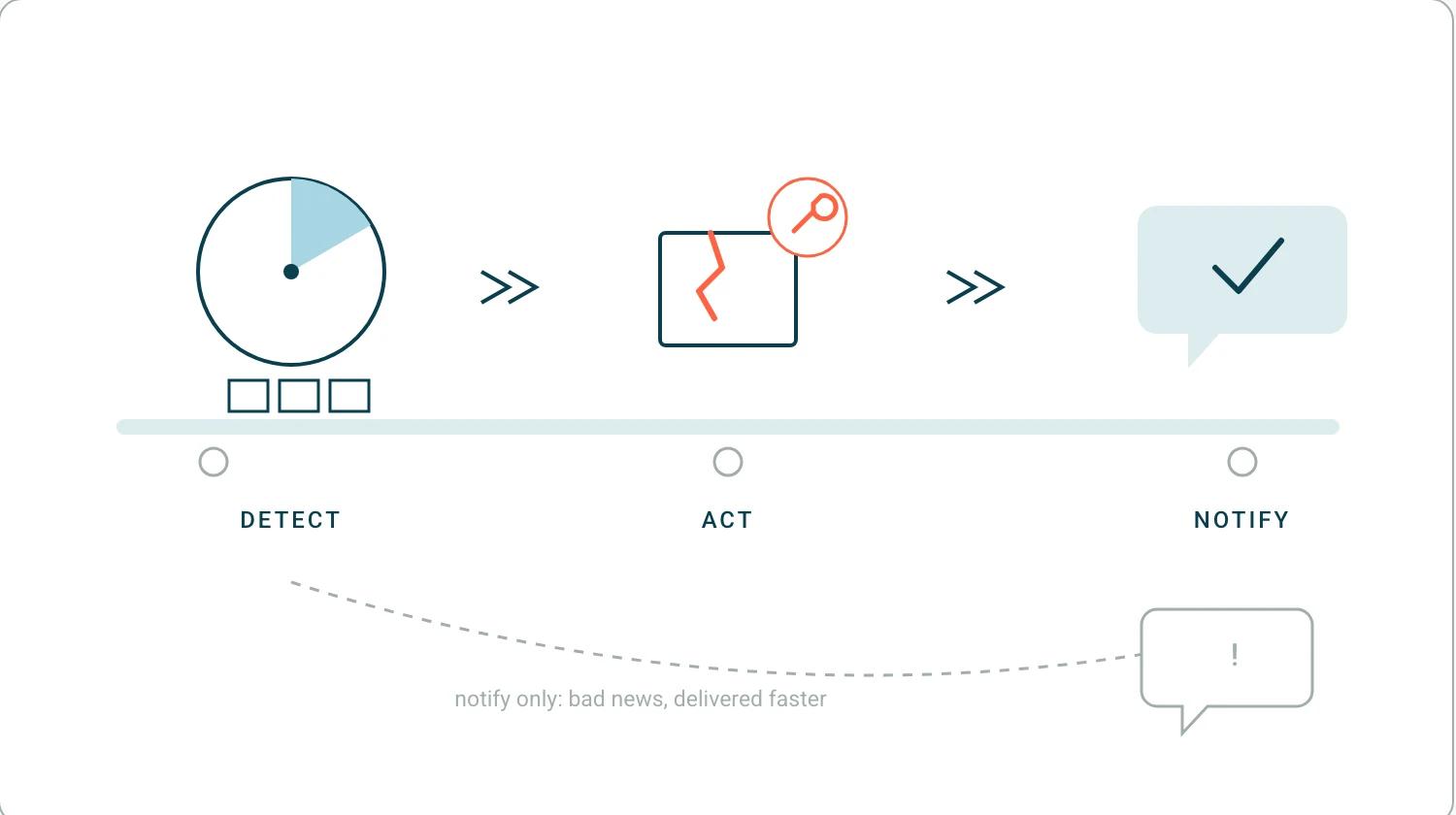
The notification is the last step, not the first
Here is the trap in this category, and the gap that created it: carriers often fail to notify customers of delays, and most brands have no automated way to tell a customer that an order due yesterday now lands tomorrow. And the biggest misconception about late orders is that they are a carrier problem. Mostly they are not: it is everything upstream before the parcel leaves, whether Shopify is syncing correctly, whether inventory is allocated correctly, whether payments are working, whether the warehouse is shipping on time. A delay notification with nothing behind it is just bad news, delivered faster. The customer now knows their order is stuck, and so do you, and the order is still stuck. When I walk a brand through the Keeyu overview, the first number I point to is the broken service level: in one walkthrough it showed 175 potential customer complaints, orders already past what was promised, with 43 percent of all orders in that region carrying an issue. We had identified every one of them in real time, and the team still had not acted on them. Notification software would have told those 175 customers the bad news politely. It would not have shipped a single replacement. The sequence that works is detect, decide, act, and then notify: spot the stuck order, fix it, and tell the customer what you already did about it. One of our customers, very early on when we were still testing, had a shopper pay about $500 for express delivery, and the warehouse did not pick it the same day. Our agent flagged that the pick-and-pack SLA had passed and notified the fulfillment team, who escalated it and got it out the door, and the order arrived on time. I remember the brand calling me about it afterwards: the shopper never knew there was a problem, a story I told on Add To Cart. The best notification is the one that never had to apologize.
The failure that taught me this generated no notification at all. A high-velocity sale day broke the sync between our storefront and the warehouse, a thousand shoppers paid for stock that did not exist, and we found out when they started calling, which I told on The Breakout CEO. There was nothing to notify anyone about, because no system knew anything was wrong.
That silence has a monthly cost in the 786 pain points we mined from 270 customer call transcripts between May 2025 and May 2026. WISMO and delivery delays were the single largest customer-driven ticket category, and the teams behind them were spending 15 to 19 hours a month on manual outreach for orders marked fulfilled that had never arrived. That outreach is a delay notification, written by hand, one at a time, after the fact.
Notifications versus the helpdesk, and versus the fix
The helpdesk page maps that category properly. Helpdesk platforms are genuinely good at what they do. Gorgias is an excellent platform for managing inbound "where is my order" tickets and triaging complaints after they have happened. Notification software sits one step earlier, narrating the order without waiting to be asked. Proactive e-commerce operations, the system of action for e-commerce, sits earlier still: it identifies the issue at the source, fixes it, and makes most of the ticket and much of the notification unnecessary. At EHP Labs, whose team walks through it in our customer story, that shift meant the same operation running with eight people instead of eighteen, catching issues in minutes instead of days, and proactively informing customers before they knew something was wrong. And there is a second-order effect nobody budgets for: at P.E. Nation, after tickets dropped 90 percent, the customer service team started proactively calling VIP customers and selling, turning a cost center into a revenue team. That is what the people answering "where is my order" all day could be doing instead.
Three layers, and it is worth naming which one you are buying. Systems of record process the order. Systems of notification report on it, read only. A system of action has deep read and write access, so it can cancel, replace and reship, and I set out that distinction on The Ecommerce Edge. Notification software is the right purchase, as long as you know it describes the problem rather than removing it.
Choosing your layer
Notifications also carry the reverse leg, where the return process generates its own silence. Buy notification software if your only problem is silence between checkout and doorstep. It will deflect the reassurance tickets, and the wider tool landscape for that job is mapped on the order tracking software page. If your problem is the orders themselves, the stuck ones, the split ones, the lost ones, then the notification layer needs an action layer under it. Keeyu detects fulfillment issues like stuck or delayed orders before the customer gets in touch, decides the fix, acts on it, and then tells the customer. Keeyu gets shoppers what they want, on time, as promised. The full discipline is on the post-purchase operations hub, and you can see it running on your own orders in a demo. Every order is a promise. Keeyu keeps it. The notification should be the receipt.
Price the layer against the headcount it replaces. We were on a call with a brand that had twenty customer service people year round and had to scale up to forty for two months of peak, which I mentioned on eCommerce Australia. Notification software does not move that second number. Something that fixes the underlying failure does, and that is a different line in the budget.
Frequently Asked Questions
What is delivery notification software?
Software that automatically messages customers about their delivery at key moments - shipped, out for delivery, delivered, delayed - over email, SMS, or other channels, driven by carrier tracking events and order data.
What should delivery notifications say when an order is delayed?
Tell the customer first, give the new expected date, and say what you are doing about it. A delay the brand announces reads as competence. A delay the customer discovers reads as a broken promise.
Do delivery notifications reduce support tickets?
Yes, notifications deflect the reassurance tickets where nothing is wrong. They do not reduce the tickets caused by genuinely broken orders unless something detects and fixes the problem behind the notification.
References
- Keeyu customer results (EHP Labs, P.E. Nation era stories): keeyu.com/customer-stories
- The Breakout CEO #86, The Pivot This Founder Made After an Investor Called It Impossible - one in five US shoppers not getting orders on time, and the ticket ratios behind it.
- Add To Cart #599, How to Prevent "Where is my Order?" Complaints Before Customers Ask - preventing "where is my order" before the customer asks.
- Marketing for SMEs, Jevon Le Roux on the E-Commerce Mistake Costing Millions - the orchestration layer, and the 55% ticket cut at EHP Labs.
Keep the promise.
See how Keeyu catches and fixes post-purchase issues before customers notice.
In one call, we’ll map your operations and show how Keeyu detects issues, decides what needs to happen, and takes action across your existing systems.
We’ll confirm your integration requirements and rollout plan during the demo.
