
Automation examples in real life
 Verified & Reviewed


 Copy Link
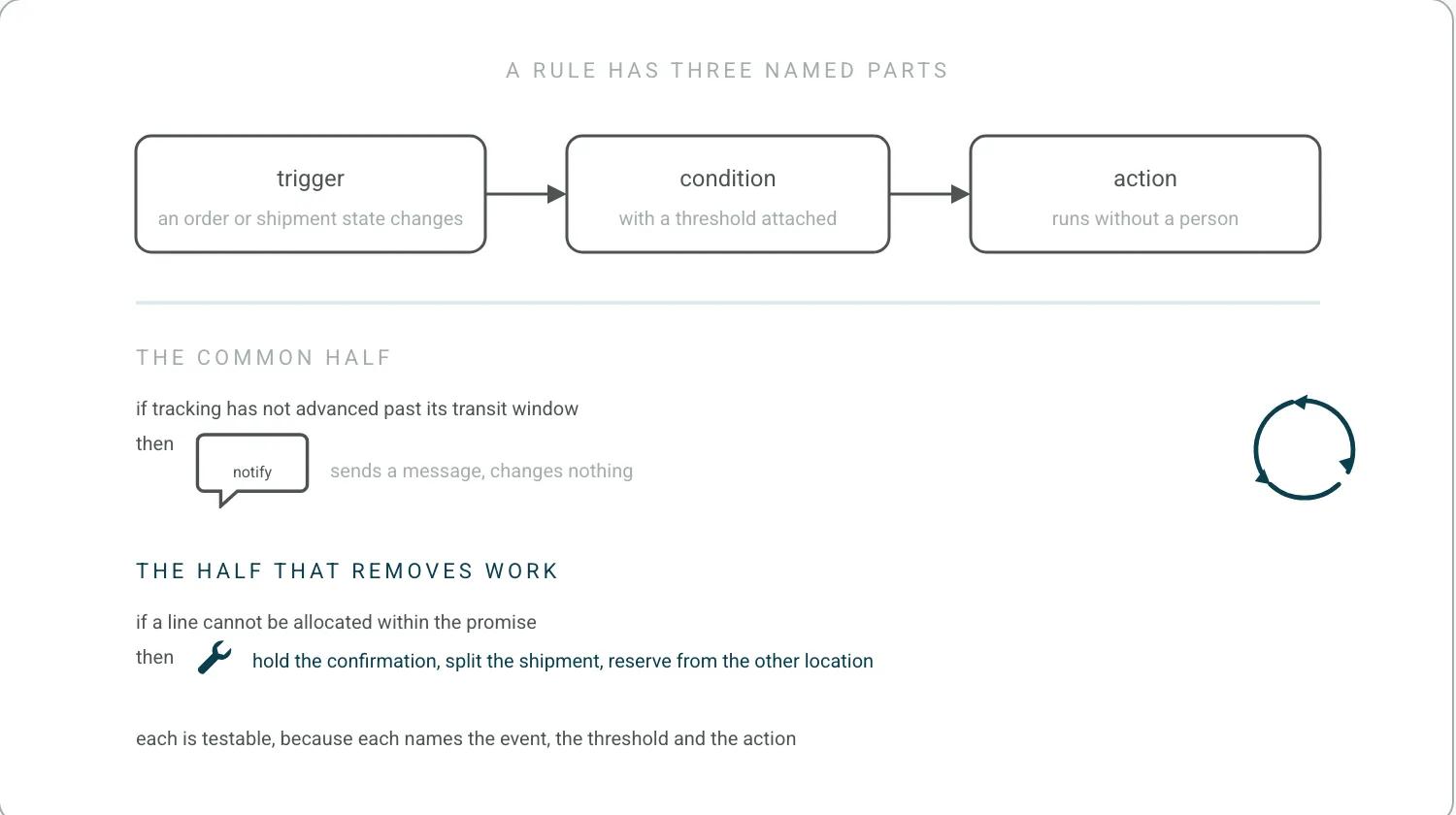
A real-world automation is a rule with three named parts: a trigger event, a condition that qualifies it, and an action that runs without a person. In ecommerce operations the trigger is usually a state change on an order or a shipment, the condition filters for the cases worth acting on, and the action is either a message to the customer or a change to the order itself. Automations that only send messages are the common half. Automations that change the order are the half that removes work. The terminology in this category drifts enough that IEEE 2755 exists to fix it, and the store-wide version of this page is automated ecommerce store.
Real-world workflows, not theory
A usable workflow is written as a specific if-then pair with a threshold attached, not as a category of task. Worked examples in post-purchase operations look like this. If a tracking status has not advanced past its expected transit window, notify the customer with a revised estimate before they ask. That threshold has to be set against something, and a carrier's own published standard is the honest reference: USPS states both its service standards and its performance against them. If a shipment is scanned as a failed delivery attempt, send the address confirmation link rather than waiting for the second attempt to fail. If an order contains a line that cannot be allocated, hold the confirmation email and send a split-shipment notice instead. If a return is scanned into the carrier network, start the refund clock and tell the customer what the clock is. That clock comes from your own returns policy. The US federal rule on refund timing, 16 CFR Part 435, covers orders that never shipped, where a buyer cancels over a missed shipping date, not returned goods. Each of those is testable, because each names the event, the threshold, and the action.
The pattern that actually works in real stacks is not to design the automation first. Start with one problem. It can be address errors, stuck shipments or split orders, and which one you pick matters less than the process. Then build the most basic version of the workflow you can: export a CSV, filter it in Excel, send the emails by hand. Let that run for a week and watch what happens. I always put it to our customers this way: Keeyu is like an employee. The first month you are looking over their shoulder, the second month you let go, and the third month you let them do their job. You execute the action manually, you choose to save it, and from then on it runs in the workflow without touching the user. The department-by-department catalog of what to run this on is examples of automation in the workplace.
The manual version of these is what the dataset is full of. Across the 786 pain points we mined from 270 customer call transcripts between May 2025 and May 2026, the same handful of jobs came up again and again: a week of one-by-one email triage for 200 oversold orders, three hours to send 40 follow-up emails on one backorder, and 3PLs that quietly prioritized new orders over the backlog so somebody had to chase the unshipped batches by hand. Each of those is an if-then pair with a threshold, once something is watching the order.
Proof of ROI and time saved
The business case for an automation is built from three numbers, which are the volume of cases it applies to, the handling time per case, and the fully loaded cost of that handling time. Multiplying them gives the recovered hours, and the recovered hours are what a budget approval is actually argued on. Two adjustments make the case honest. The first is that automation rarely removes a queue completely, so the realistic figure is the share of cases that follow the happy path rather than the total. The second is that the exceptions left behind take longer per case than the average did, so the remaining queue does not shrink in proportion to the ticket count. The same adjustment applies to any deflection case, and it is worked through on customer self-service and measured on resolution time. A case built on ticket count alone tends to overstate the saving.
Two things make an ROI case in this category honest, and neither is a percentage. The first is scale: one oversell workflow saving an hour of manual work across five orders is a real, checkable number, and it multiplies transparently. The second is the threshold. My rule of thumb is simple. More than about five hours a week on spreadsheets chasing post-purchase issues is your business case. Under two hours, keep it manual, because the return is not there yet. Most published automation cases skip both and lead with the percentage. Building the baseline they should have started from is ecommerce benchmark.
Specific tool stacks
An automation is only as reliable as the connection between the systems it spans. The systems involved in a post-purchase workflow are typically the storefront, the order management or ERP system, the warehouse management system or third-party logistics provider, the carrier, the returns platform, and the helpdesk. Getting a rule across all six is third-party integrations work. Where the rule lives decides what it can do. A rule inside a helpdesk can tag, route, and reply, and cannot change an order. A rule inside a messaging platform can send, and cannot see whether the parcel moved. A rule with access to the order state can do both, which is why the same workflow described in one sentence can be trivial or impossible depending on which system it is built in.
Keeyu itself started on the detection side. On the eCommerce Australia podcast I said: "In fact, when we launched, we only believed in detection and then teams manually fix. But about a year ago, we realised that automation was the real one. And then that's when we started building the system of action into place."
Worth being precise about what automated means here, because the word is doing a lot of work in this category. It is not fully automated in the wide sense of a system that runs your operation. It is automated in the narrow sense: the system updates, the emails, the status changes and the record-keeping happen without a person, so the team is not doing that work. The judgment stays with people. Any vendor claiming the wide version is either selling something narrower or has not met an exception yet. I have talked about where that line sits in an interview about building this.
Edge-case handling
Edge cases are where automation either earns its place or creates work. The recurring ones in post-purchase operations are an address change requested after dispatch, a partial fulfillment where one line ships and another does not, a parcel marked delivered that the customer says never arrived, a return that is never scanned into the network, and a duplicate order created by a customer who assumed the first one failed. Watching a parcel closely enough to catch the middle three is parcel software. Each needs an explicit path, because the default behavior of an unhandled edge case is silence, and silence is what generates the contact. The design rule that follows is to write the exception branch at the same time as the happy path rather than after launch.
This is where automation projects are won and lost and I have seen both extremes fail: handling every exception with people alone, and set-and-forget automation. An agent needs guardrails, so we give it a clear start line, a clear finish line and the parameters it has to work within. When we rolled a workflow out with a customer, we did a bunch of testing with them, then ran just five workflows while they watched, and we only expanded once they said they were okay with it. The user can see the workflow, watch it unfold and intervene wherever necessary. That is where the speed and the safety both come from. The hard part of the exception branch is testing it. A failure might only happen once every three days, or it can happen 10 times in a day, so the question we had to solve was how you test while you are waiting for that failure to happen. Which decisions get a fixed path and which get an agent is the line Anthropic draws in Building effective agents, which separates workflows on predefined code paths from agents that direct their own process and warns that agent autonomy brings the potential for compounding errors. It is the same line drawn on ecommerce chatbots. Every order is a promise. Keeyu keeps it. The exception branch is where you find out whether your own automation can do the same for a case it was not designed for. The operating model that treats the exception as the main event is post-purchase operations.
On a Retail Fest 2026 panel I said: "whatever your human is doing today to triage it after the fact the agentic workflows can do that and I think the key critical thing is they have to be deterministic ... it follows a path of yes no decisions ... It's going to hallucinate and fail and you can't have that with financial transactions and inventory management."
Frequently Asked Questions
What are some examples of automation?
In post-purchase operations, written as rules with a threshold attached. If a tracking status has not advanced past its expected transit window, notify the customer with a revised estimate before they ask. If a shipment is scanned as a failed delivery attempt, send the address confirmation link. If an order contains a line that cannot be allocated, hold the confirmation and send a split-shipment notice instead.
What are some examples of automation in the workplace?
The department-by-department catalog, covering order-status deflection, returns workflows, routing, exception management and helpdesk triage, is on examples of automation in the workplace. This page is about the anatomy of a single rule and the case for building it.
What are the top automation tools?
Naming tools is the least useful answer here, because the same workflow described in one sentence is trivial or impossible depending on which system the rule lives in. A rule inside a helpdesk can tag, route and reply, and cannot change an order. A rule with access to the order state can do both. Ask where the rule runs before asking what it is called.
References
- IEEE. IEEE 2755. The terminology the category keeps blurring.
- United States Postal Service. USPS states both its service standards and its performance against them. A published reference for the transit-window threshold.
- US Electronic Code of Federal Regulations. 16 CFR Part 435. The refund deadline for orders that miss their shipping date, which returned goods do not fall under.
- Anthropic. Building effective agents. The distinction between workflows on predefined code paths and agents that direct their own process, and the compounding-error risk of agent autonomy.
Keep the promise.
See how Keeyu catches and fixes post-purchase issues before customers notice.
In one call, we’ll map your operations and show how Keeyu detects issues, decides what needs to happen, and takes action across your existing systems.
We’ll confirm your integration requirements and rollout plan during the demo.
