
How to keep track of orders for a small business
 Verified & Reviewed


 Copy Link
Keeping track of orders means holding one record per order that shows its current state and flags the ones that have stopped progressing. A small operation needs three things to do it: a single place where every order from every sales channel appears, a defined set of states an order can be in, and a rule for what counts as late. The third is the one usually missing. Without an expected date attached to each order, a list of open orders cannot distinguish an order that is in transit normally from one that stalled a week ago, and every order has to be checked by hand. That expected date is the delivery promise, and in the US it is also a commitment the FTC's Mail, Internet, or Telephone Order Merchandise Rule holds a seller to, which is a reason to record it whatever the tooling.
Three tiers, and the right one follows volume rather than ambition
Tools in this category sit on three tiers and the right tier follows order volume rather than ambition. A spreadsheet works at low volume, holds the order, the channel, the ship date, the expected date, and the state, and fails when two people edit it or when the channel count rises. A lightweight order-tracking or post-purchase app connects the storefront and the carriers, aggregates tracking, and adds a customer-facing lookup page, which covers most single-channel operations. A multichannel order management system becomes necessary when inventory is shared across several channels, because that is the point at which the failure changes from being slow to being an oversell. The tool tier below it is covered on free apps to keep track of customer orders and the ordering side is an online ordering system for small business. Moving up a tier before the failure appears usually costs more in setup than it saves. The test I use for when to move is one question: map every system that touches an order and ask whether a single person can see payments, fulfillment and customer messages in one place. If not, that is your next problem to solve.
Three workflows, and the one that matters most is built last
Three workflows remove most order-status contact and they are worth deploying in order. Send the shipping confirmation with a tracking link the moment the parcel is scanned, since the largest single cause of the question is the customer not knowing anything has happened. The scan itself comes from the carrier, published as such in feeds like the USPS Track and Confirm API. Publish a lookup page on the business's own site so a customer can check without emailing, which is the simplest form of customer self-service. Then add the one that matters most and is usually last, which is a proactive message when an order passes its expected date without a delivery scan. The first two answer questions about orders that are fine. The third is the one that reaches the customer who is about to write in, and it is the whole of proactive customer service.
Worth knowing the size of what those three workflows are aimed at. Order-status questions are 40 to 60 percent of a support queue in this industry in what I see, and at small scale that is not an abstraction, it is most of your inbox on a Monday. I have made that case on Add To Cart. The three workflows are ordered the way they are because the first two handle the orders that are fine and the third handles the ones that are not, and the third is the one everybody builds last.
The sort matters more than the list
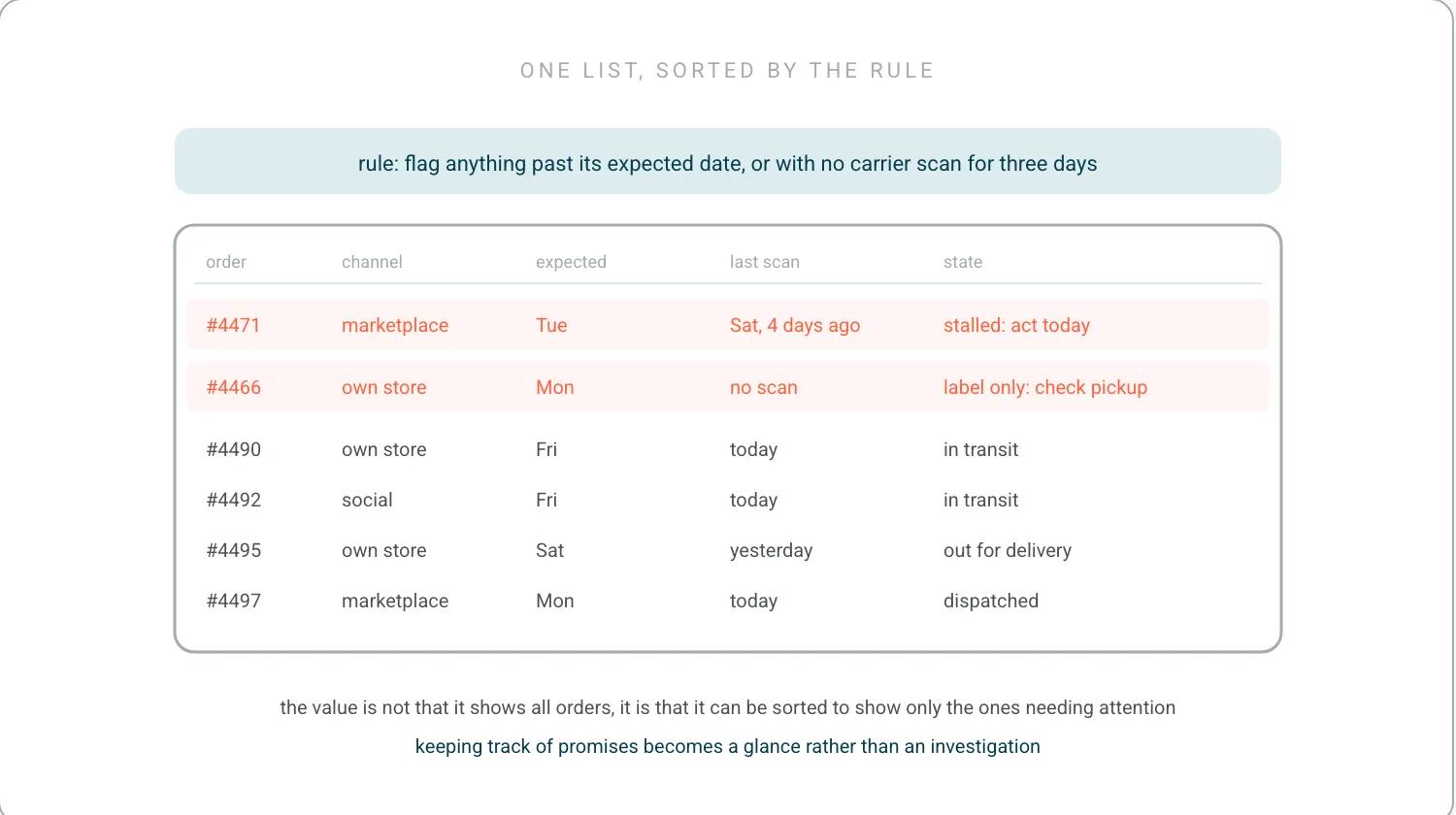
A central view means every channel's orders in one list, including the marketplace ones that are easy to leave out. Its value is not that it shows all orders but that it can be sorted to show only the ones needing attention, which is what removes the daily check. The practical build is a list of open orders with the channel, the expected date, the last carrier scan, and a computed flag for anything past its date or without a scan in a set number of days. Setting that threshold against a published standard rather than a guess is easier than it sounds, since carriers publish theirs, including USPS service performance. The paid version of this view is order tracking software. Building this in a spreadsheet is legitimate at small volume, and the part that has to be automated first is the import, because a view someone has to populate by hand stops being current within a week.
The reason the sort matters more than the list is that moving between systems strips the context out of an order. I came off a call with a customer running six regions and eight warehouses whose team spent all day switching systems, running reports out of each and pivoting tables to find the orders with a problem. The fix was one central view with the metrics that matter and issues flagged in real time, the same fix at a fraction of the size. You open the storefront and see one thing, the carrier page and see another, and by the time you are back you have lost the thread of what you were checking. A small operation feels that as an afternoon disappearing rather than as a system problem. Every order is a promise, and one view exists so that keeping track of promises is a glance rather than an investigation. The version of this a larger operation runs is post-purchase operations.
A one-page procedure with one owner
The procedure that keeps a small operation from firefighting has four steps and fits on one page. A daily exception review, which is one pass down the flagged list rather than a review of every order. A defined action per exception type, covering a stalled shipment, a failed delivery, an out-of-stock line, and a return not received. A single owner for the review, even where that owner is the founder, since a task shared between two people at this size is a task nobody does. Running a startup taught me the same thing: every decision without an obvious owner lands on the founder's desk anyway, so name the owner and let the review land there on purpose. And a weekly count of exceptions by type, which is the only part that is not urgent and the only part that tells the business what to fix upstream. That count is the small-business version of the ecommerce benchmark audit.
Price the manual hours before pricing the tool
The honest comparison is between what a tool costs and what the manual version costs in time. A small operation should count the hours per week spent checking orders, answering status emails, and reconciling channels, then price them at what the person's time is worth. When I put this to brands, the figure I use is 12 minutes per where-is-my-order email, because the answer sits across several systems and someone has to piece it together just to tell a shopper it is on the way. At 30 status emails a week that is 6 hours before anyone has checked an order for problems, though fewer systems can mean fewer minutes, so time ten of your own first. Below a few hours a week, a spreadsheet and a shipping confirmation cover it and paid tooling is hard to justify. Above that, the tool pays for itself on time alone before any deflection is counted. The cost that is consistently underestimated on both sides is setup, since a free tool that takes a day to connect and a paid one that takes an hour are not separated by their price. What that connection work involves, whoever does it, is third-party integrations.
Frequently Asked Questions
How do you keep track of purchase orders?
One record per order, one defined set of states it can be in, and an expected date attached to each so that late is a computed flag rather than a judgment. Without that third part a list of open orders cannot separate an order in normal transit from one that stalled a week ago, and every order has to be checked by hand.
What is the best order tracking app for small businesses?
This page is about the process rather than the product, because the process is what decides whether a tool helps. The tool tiers, and where a free one stops, are on free apps to keep track of customer orders. The right tier follows order volume rather than ambition.
What are some good apps to help me keep track of my small business?
Rather than a list, the sequence: get every channel's orders into one view, add an expected date per order, then automate the import, because a view someone populates by hand stops being current within a week. Only then does the choice of tool change the outcome.
References
- US Federal Trade Commission. FTC's Mail, Internet, or Telephone Order Merchandise Rule. The expected date as a commitment, which is why it has to be recorded.
- United States Postal Service. USPS Track and Confirm API. Where the scan behind the shipping confirmation comes from.
- United States Postal Service. USPS service performance. A published standard to set the late flag against.
Keep the promise.
See how Keeyu catches and fixes post-purchase issues before customers notice.
In one call, we’ll map your operations and show how Keeyu detects issues, decides what needs to happen, and takes action across your existing systems.
We’ll confirm your integration requirements and rollout plan during the demo.
