
Order entry software
 Verified & Reviewed


 Copy Link
Order entry software captures orders and places them into a business's systems in a consistent, validated form. In a purely direct-to-consumer operation the storefront performs this automatically, so the term is most used by businesses taking orders through additional routes: wholesale and B2B accounts, phone and email orders, sales representatives, marketplaces, and EDI connections. Its job is to make those routes produce the same clean order record the storefront does, so everything downstream can treat them identically. What that record looks like on a storefront is set out in the Shopify Order resource, and what holds it once created is an order management system.
Automation of manual data entry
The problem being solved is orders that arrive as unstructured input, typically an emailed purchase order, a spreadsheet, or a phone call, and are keyed into a system by a person. Automation approaches include customer-facing B2B portals that let accounts place their own orders, document parsing that extracts line items from a purchase order, EDI for established trading partners, and API submission for integrated customers. The measurable outcomes are orders entered per hour, elapsed time from receipt to entry, and the proportion of orders requiring any human touch.
Five checks at entry, before the pick
Manual entry produces a characteristic error set: wrong SKU, wrong quantity, wrong price or discount, wrong ship-to address, and duplicate orders. Validation catches these at the point of entry rather than at the warehouse. Five checks are standard. SKU existence and status, which is only reliable where the same physical item carries the same identifier everywhere, the job of the GS1 GTIN. Quantity against available stock. Pricing against the account's agreed terms. Address verification against a postal reference. Duplicate detection against recent orders for the same account. The value of catching an error at entry rather than at dispatch is that the cost of correction rises sharply once an order has been picked, packed, or shipped.
One order record across every route
Businesses selling through several routes end up with orders in several formats and often several systems. Consolidation means normalizing them into one order record with a shared structure, so that stock allocation, fulfillment, reporting, and support operate on a single view. B2B orders complicate this because they carry account-specific pricing, credit terms, partial-shipment rules, and sometimes delivery scheduling that direct-to-consumer orders never have. A consolidated view is a prerequisite for accurate available-to-promise inventory, since stock committed to a wholesale order is not available to the storefront. Available-to-promise and allocation are settled terms with definitions worth borrowing rather than inventing, in the CSCMP supply chain glossary. Running the same stock across several channels is multichannel retailing and omnichannel order management.
Most brands have not planned for the next route. A shopper buys through Gemini and never touches your site, then there is a delay, or the item arrives damaged, or they want to return it. Where do they go? The brands that win will have operations that can handle orders they never saw come in.
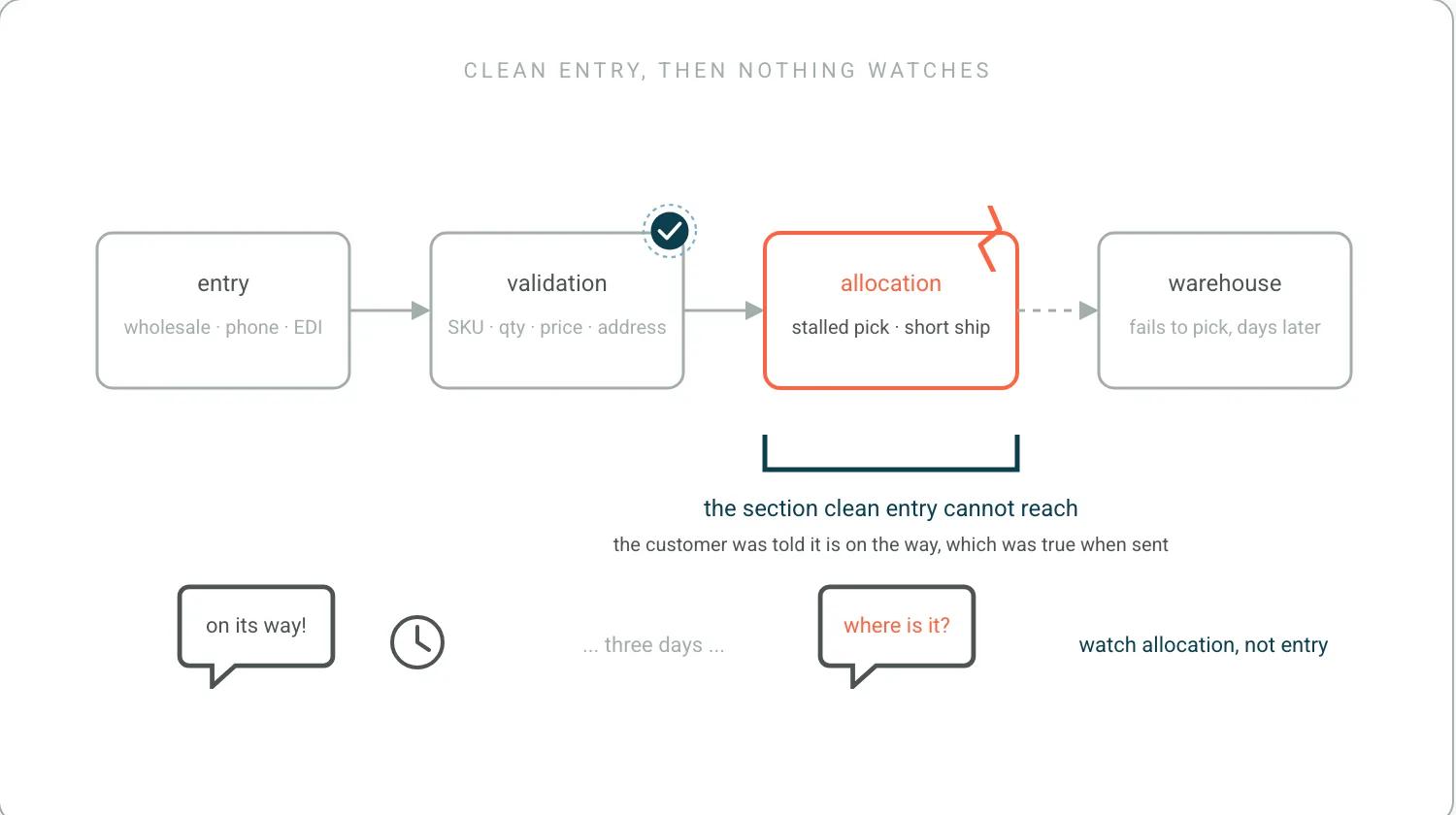
Allocation is where clean entry stops being enough
Allocation is the step that reserves specific stock against a specific order. Visibility means being able to see, per order, whether it is allocated, partially allocated, or waiting, and why. The states that generate downstream work are the unallocated ones: stock that has not arrived, stock committed elsewhere, or a bundle whose components are not all available. The customer-facing consequence is split shipments. Without allocation visibility these orders are indistinguishable from healthy ones until the warehouse fails to pick them, which is typically several days after the customer's expectations were set. The software category that runs the surrounding process is order management software.
This is the section where a clean order record stops being enough. Dispatch service levels are usually controlled and measured. Detecting a pick that has stalled, a partial fulfillment, or a short shipment is usually still a manual fire drill. Most of what makes an order late happens upstream: is the inventory allocated correctly, is the warehouse getting it out on time. A help desk does not know those small failures exist until a shopper writes in. An operations lead at a large retailer told me he checks a report several times a day just to see how old the orders in the distribution center are. Meanwhile the customer has been told their order is on the way, which was true when the message was sent and is not true now. That is the gap proactive customer service exists to close, and it is what WISMO volume is actually made of.
Speed to fulfillment: watch the distribution, not the average
Processing time is the interval between order receipt and release to the warehouse, and it is the portion of the delivery promise the merchant controls most directly. It is consumed by entry, validation, payment authorization, fraud review, allocation, and any manual approval steps. Reducing it usually means removing handoffs rather than speeding up individual steps, since queue time between steps typically exceeds work time. Whether the promise it feeds is being met is on-time delivery. The measure worth tracking is the distribution rather than the average, because the orders that sit for days are the ones that generate contact, and an average hides them.
The distribution point above is the right one, and here is what the tail actually looks like. One brand's process for a single backorder was to open the storefront, check the ERP, check the third-party logistics portal, and then email the customer. I was CEO at SurfStitch and P.E. Nation before I built software for this, which Founders in Motion covered, and that loop is the part of the day that never makes it into a process document. Five minutes, per backorder. On a big promotional week that is a hundred backorders and more than eight hours of somebody's time, for one issue type out of many. Nobody entered those orders badly. They were entered perfectly and then nothing watched them. Operators describe the same shape on our customer calls, and it runs all through the 786 pain points we mined from 270 customer call transcripts between May 2025 and May 2026: orders stuck in middleware between the storefront and the ERP, partial fulfillments that disagreed from one system to the next, integrations that broke during an ERP migration, and, on one operator's own count, 40 customer follow-up emails for a single backorder issue consuming three hours. That is the whole argument for proactive e-commerce operations in one number: clean entry gets an order into the system, and what happens after that is where it is won or lost. Every order is a promise. Keeyu keeps it. Getting it there fast matters only if something notices when it stops. The connection work that lets something notice is third-party integrations, the small-business end of the same problem is an online ordering system for small business, and the operating model is post-purchase operations.
Frequently Asked Questions
What is the best order management software?
Order entry and order management are different jobs and this page is about the first. Entry captures orders from routes the storefront does not cover, such as wholesale, phone and EDI, and turns them into the same clean record. Managing the order afterwards is order management software, and the two are frequently sold together.
Is there a free app that can create purchase orders?
Free purchase-order tools exist and they solve the document rather than the operation. The question worth asking of any of them is what happens to the order after it is created: whether it lands in the same record as every other channel, whether allocation is visible, and whether anything notices when a line cannot be filled.
What is the best app for keeping track of orders?
Tracking an order after it exists is a different product from capturing it, and for a small operation the method matters more than either. How to keep track of orders for small business covers the process, and this page covers getting the order into the system cleanly in the first place.
References
- Shopify. Shopify Order resource. What a clean order record actually contains.
- GS1. GS1 GTIN. SKU validation only working where identifiers are shared.
- Council of Supply Chain Management Professionals. CSCMP supply chain glossary. Settled definitions for allocation and available-to-promise.
Keep the promise.
See how Keeyu catches and fixes post-purchase issues before customers notice.
In one call, we’ll map your operations and show how Keeyu detects issues, decides what needs to happen, and takes action across your existing systems.
We’ll confirm your integration requirements and rollout plan during the demo.
