
Automating ecommerce work: the nine jobs, and the one everyone skips
 Verified & Reviewed


 Copy Link
What automating ecommerce work actually means
Automating ecommerce work means having a system carry out the operational tasks someone currently does by hand: checking whether an order moved, keeping stock true, and telling a customer their parcel is late before they ask. The unit is the task, not the tool.
Most guides answer with software when the question is which of your own jobs a machine can take. With online shopping at 16.9 percent of US retail sales, there is more of this work than any team gets through by hand.
Before automating any of it, I map the work. Most integration projects fail before a single API call because nobody mapped the workflow or defined success first. So we map the full post-purchase flow, payment, fulfillment, shipping and returns, and mark every point where an order can fail. We don't automate chaos. We design the fix first, then we connect the tech.
How ecommerce automation works: trigger, condition, action
Every automation has the same shape, whatever tool you build it in.
- The trigger: The event that starts the automation, such as a tracking number going quiet.
- The condition: The test of whether this case qualifies, such as whether the service was express or the ship-by date has passed.
- The action: The work the automation does, such as tagging the order, emailing the customer, issuing the refund or opening a claim.
Most tools stop at the trigger. Your storefront, payment provider and ERP will all flag something for you, but a flag is not an automation. It is a notification that you have work to do.
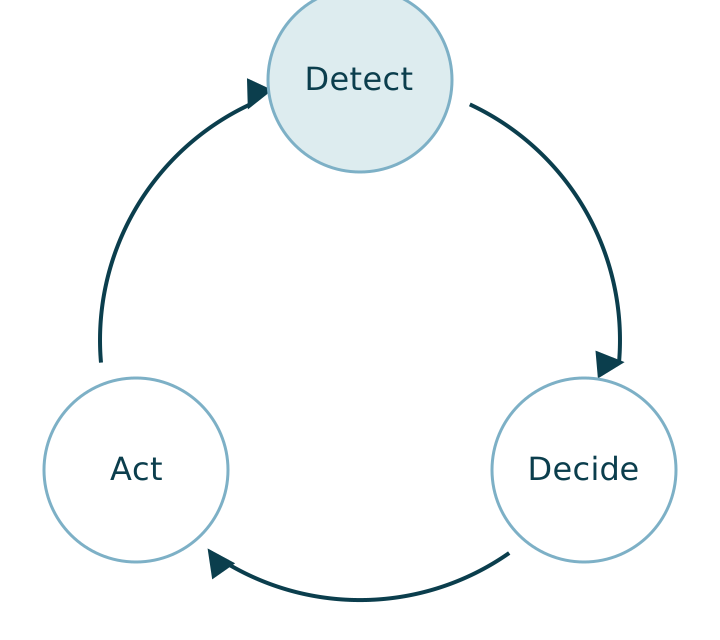
We describe the full loop as detect, decide, act. The last part runs from manual trigger and user in the loop to fully automated. Fulfillment, returns and payments make thousands of decisions a day, and no business can put a person on each one, so I build flexible checkpoints. Workflows handle the repetitive tasks consistently, low-risk work runs on autopilot, and a person steps in where judgment matters: high-value orders, fraud checks, brand moments. Anything the automation cannot solve escalates to a customer service person.
The ecommerce work you can automate today
Most brands automate the simple jobs, like prepping shipping labels and sending status updates. Plenty more can come off your team's plate:
- Order intake and processing: Tagging, routing, address and fraud checks, payment verification, and holding anything that trips a risk rule before the warehouse picks it.
- Inventory and stock sync: Keeping stock true across every location, channel and inbound purchase order, so a line below threshold gets reordered or hidden before anyone oversells it.
- Shipping, labels and carrier selection: Matching the service to the promise made at checkout, not to the cheapest rate. An order paid for next-day delivery routes to a carrier that can still make next-day from that warehouse, which is where ecommerce fulfillment holds or breaks.
- Post-purchase status updates: Telling the customer what is happening while they wait, including the awkward parts. A parcel sitting at a collection point gets nudged until someone collects it.
- Exception handling for stuck, unshipped and failed-sync orders: The orders that stopped moving and told nobody, whether never synced to the warehouse, given a label that was never scanned, or left on a hold nobody actioned. Almost nobody automates this, because catching it means comparing what the storefront, the warehouse and the carrier each believe.
- Returns, refunds and exchanges: RMA approval against policy, label generation, and the refund firing on the receipt scan rather than when someone reaches the queue. The National Retail Federation put US retail returns at $890 billion in 2024.
- Support triage and routing: Classifying tickets, pulling the order record in, and routing to a queue that can answer. It is still downstream of whatever caused the ticket, which is the argument for proactive customer service.
- Marketing, abandoned carts and reviews: Cart recovery, win-backs, and review requests timed off delivery rather than dispatch, so the request never lands before the parcel.
- Pricing, catalog and reporting: Price and promotion rules, bulk catalog edits, and the report somebody rebuilds by hand every morning. This is usually the fastest group to pay back.
Start with the list that never reaches a customer. Between 40 and 60% of all tickets are some version of where is my order, a share our CEO Jevon Le Roux gave on The Breakout CEO, and every one of them is generated by an operational event that could have been detected and acted on. Without a shared order ID tying the storefront, warehouse, carrier and payment records together, you are working blind, and WISMO tickets keep flooding in. That is the work worth automating first, before any of the marketing side.
Why the post-checkout stretch stays manual
What keeps this stretch manual has little to do with the technology.
- It spans systems: None of them sees a whole order. The storefront knows whether it was paid for, the warehouse whether it was picked, and the carrier whether it moved.
- It spans teams: The stretch between marketing, support and operations belongs to nobody.
- The data arrives late: Your picture of the order completes after the customer's does.
Giving that stretch an owner and a detection layer is what post-purchase operations is.
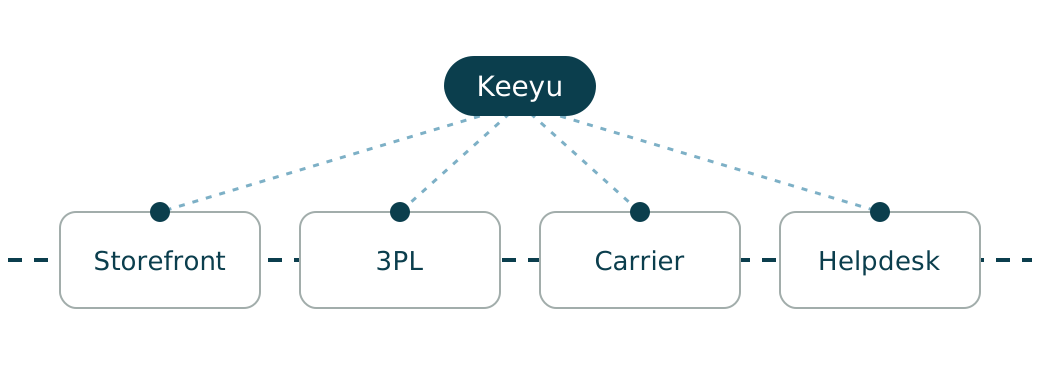
So coverage stops at the happy path. Almost every brand automates the confirmation and the tracking email, nobody automates the exception, and the exception is where the manual work accumulates. It is why WISMO tickets keep arriving at brands that think post-purchase is handled.
My co-founders and I worked for decades in retail and ecommerce, and we saw the same chaos everywhere: from the buy button to the doorstep and back on a return, tens of systems are involved. Customer care cannot see the order as it moves from storefront to warehouse, ERP, carrier and returns platform.
Jevon has described what that cost at one global brand. Across five storefronts, five warehouses, several carriers and multiple ERP locations, one person had to open 65 tabs and alt-tab between them all day, running a report out of each and cross-referencing by hand. That is a missing system, staffed by a person.
If you automate one thing here, automate detection. Build these in order:
- An order still unshipped past its promised ship-by date
- A tracking number issued but never scanned by the carrier
- An order placed in the storefront but never synced to the warehouse or 3PL
- An oversell, checked against real stock across every location and inbound purchase order
- An address validation failure caught before the pick, not after the return
- A parcel marked return to sender by the carrier
Then attach the resolution rather than another alert. We built Keeyu as an orchestration layer rather than a point solution, working backwards from the promise the customer was given. An order behind where it should be goes amber before it goes red, and the workflow that fires does the resolving.
The category term for the difference: most tools here are systems of notification, read-only, telling you something happened. A system of action has deep APIs with full read and write, so it can detect, notify, and act across every platform. That write capability is the whole game.
Done well, this looks like silence. One of our customers had a $500 express order the warehouse did not pick that day. The pick-and-pack SLA breach was flagged, the fulfillment team was notified, the order went out, and the customer never knew there was a problem.
For the tickets that still land, our global search answers them in seconds, by order number, ID, tracking number, customer name, or email, with the status right there.
It stays manual because being proactive by hand is expensive. The brands that manage it hire people to mine the systems, run exports and pivot tables, and go looking for the needle in the haystack, so most teams stay reactive because it is cheaper, as Jevon put it on The Ecommerce Edge. I have watched too many e-commerce teams spend 6 months deploying ops tools that were already outdated the day they launched, and phase 2 never ships because phase 1 drained the team. Ecommerce does not move in quarters. It moves in days. Automating the detection and the fix is what makes proactive affordable rather than admirable.
Rule-based automation, proactive AI, and what Keeyu does instead
Ecommerce automation is not one thing.
- Rule-based automation: Fixed if-then rules you write yourself. They are predictable, auditable and cheap, but blind to anything you did not anticipate.
- AI-powered automation: Software that decides from patterns in your data rather than rules you wrote, so it handles the calls rules are bad at.
- "Done-for-you" automated stores: The passive-income dropshipping offer. It is a different category with a different buyer, and not what this page means.
What we do is AI combined with fixed workflows. AI is not 100% deterministic, so when the agent acts it takes a predetermined path, a path of yes and no decisions, because you don't want to refund hundreds of customers wrongly. An agent that can refund thousands of dollars cannot carry even a 0.1% chance of error, because the 1% an automation gets wrong can break the business. The category is proactive e-commerce operations, the system of action for e-commerce. Detect. Decide. Act.
In our customers' numbers, that is worth about one and a half percentage points on the bottom line, through retention and the manual work that stops happening. One brand ran 20 year-round customer service staff and used to scale to 40 for two months over peak. It no longer needs the extra 20. Everyone else is chasing AI for customer service by replying faster. We are saying that never needs to exist.
Every order is a promise. Keeyu keeps it, and gets customers what they want, on time, as promised. See how the workflows run or book a demo.
Jevon draws the split as reactive versus proactive on The Breakout CEO. Reactive AI answers a question well from a knowledge base. Proactive AI prevents the event that would have produced the question. Rules sit underneath both, and rules only cover what someone thought to anticipate. Most people think of AI in ecommerce as a chatbot, but that is not what keeps operations alive. Ops AI isn't built to talk. It's built to fix.
Related reading
- Ecommerce automation services: what you are actually buying
- Ecommerce automation software: what it can and cannot fix
References
- US Census Bureau, Quarterly Retail E-Commerce Sales, first quarter 2026
- Retail Fest 2026 panel, Post-Purchase Perfection: Delivering Experiences Customers Rave About
- National Retail Federation, 2024 consumer returns in the retail industry
- Spotlight Fridays with Jevon Le Roux
- Add To Cart #599, How to Prevent "Where is my Order?" Complaints Before Customers Ask
- Add To Cart #578, Stop Customer Problems Before They Start: Inside Keeyu's Ops
- Give it a Nudge: Keeyu is Solving the "Where's My Order?" Nightmare
- eCommerce Australia, Keeyu: Making the words "Where Is My Order?" redundant in 2026
- The Ecommerce Edge E637, Proactive Post-Purchase Ecommerce Ops and CX
- The Growth Concept, Entrepreneurship Lessons from a CEO ft Jevon Le Roux
- The Breakout CEO #86, The Pivot This Founder Made After an Investor Called It Impossible - one in five US shoppers not getting orders on time, and the ticket ratios behind it.
- The 9-5 Exit Plan, How AI Is Making Customer Support Invisible - proactive AI and support that disappears.
Frequently Asked Questions
What ecommerce work should I automate first?
Not the biggest job, but the most repeated one with the clearest rule. Sort last month's tickets by volume and take the top item whose rule you can write in one sentence. For most brands that is order status, and the first move is a daily list of orders that have not moved.
Why do I still get "where is my order" tickets after automating?
Because you automated the notifications, not the causes. A tracking email says where the parcel is and does nothing when it is not moving, which is the case that produces the angry ticket.
Can returns processing be automated?
Most of it. RMA approval against policy, label generation, and the refund firing on the receipt scan rather than when someone reaches the queue. What stays manual is judgment: the out-of-policy exception, the damaged item, and the account you want to keep.
What should I not automate?
Anything where the right answer depends on who the customer is: goodwill calls, the genuinely angry conversation, and the complaint that is really about something else. Low-risk, repetitive tasks can run on autopilot, but I keep a person on the calls where judgment matters, such as high-value orders, fraud checks and brand moments. Take the repetitive work off the team, and their day goes to the conversations that need a person.
Do I need developers to automate ecommerce work?
Not for the common jobs. Platform-native tools and app integrations cover intake, stock and notifications with configuration rather than code. Engineering is for the automations that must reconcile systems never designed to talk to each other, which is the post-checkout case.
Keep the promise.
See how Keeyu catches and fixes post-purchase issues before customers notice.
In one call, we’ll map your operations and show how Keeyu detects issues, decides what needs to happen, and takes action across your existing systems.
We’ll confirm your integration requirements and rollout plan during the demo.
