From Reactive to Proactive in E-commerce Operations: The Ops & CX Playbook
 Verified & Reviewed


 Copy Link
Moving from reactive to proactive e-commerce operations means changing who discovers that an order broke. Reactive: the customer discovers it, and opens a ticket to tell you. Proactive: the system discovers it from the order data and acts on it before the customer notices.
E-commerce operations have long been stuck in a reactive cycle - problems surface only when a customer complains. Moving to proactive operations changes the game. Instead of chasing issues after they happen, you detect and resolve them before the customer notices.
Mareile Osthus, co-founder of humii, explains why the proactive version works at all: "Every time a shopper has to go find out something, you have already added friction. The retailers who win are the ones who remove guesswork before it even enters the customer's mind." The mechanism is the anxiety gap, the stretch of time between a problem happening and the customer learning about it. Reactive operations leave that gap open for days and the customer fills it with the worst available explanation.
Every order is a promise. Keeyu keeps it. We flip the model from reactive to proactive: when a problem happens, we detect and fix it automatically, so the customer never knows. No ticket, no apology, no trust lost.
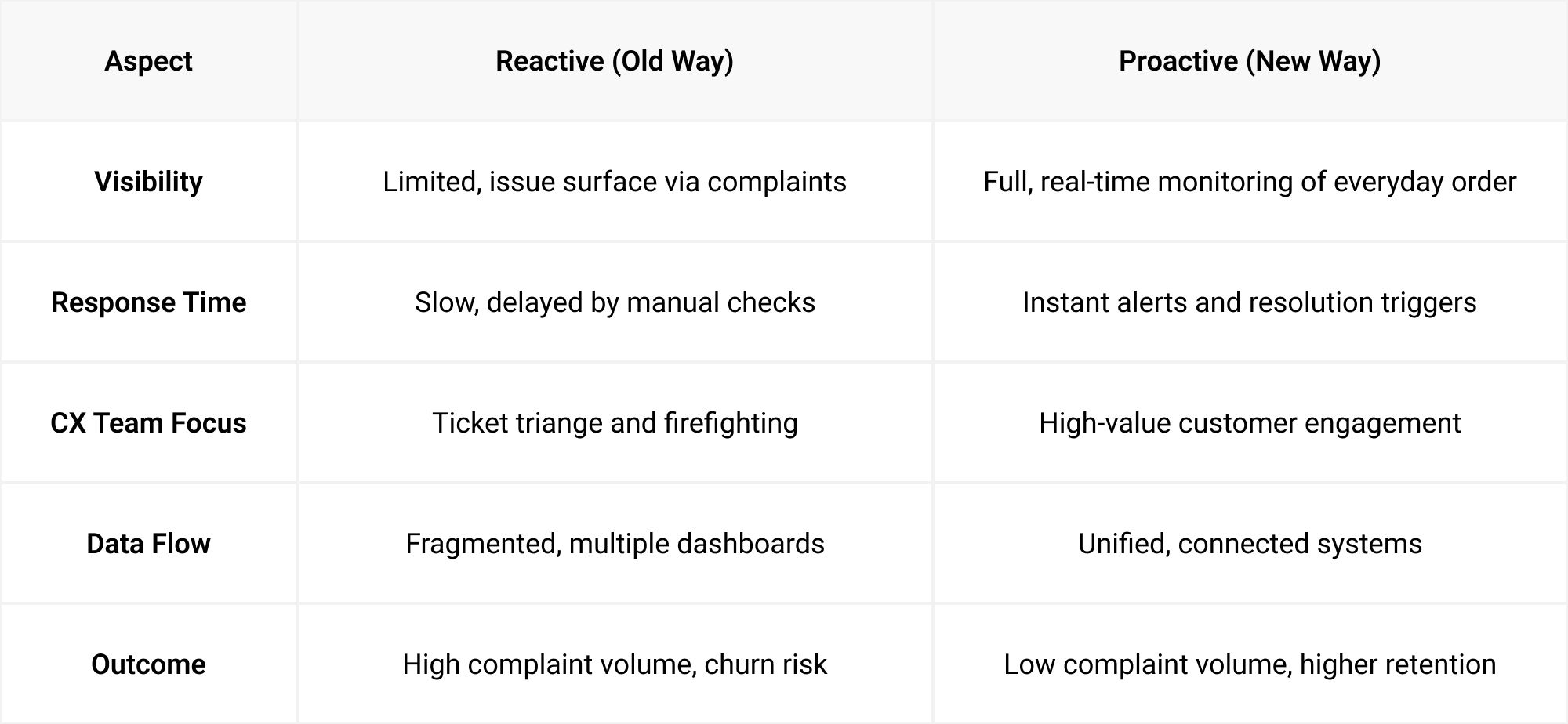
Reactive vs Proactive - The Operational Gap
The gap in one contrast: tools like Wonderment are reactive post-purchase tracking, they can show you a problem but not fix it. Proactive operations prevent the problem from ever happening, detecting the operational failure in real time and launching the workflow that fixes it before the customer knows.
Aspect | Reactive (old way) | Proactive (new way) |
|---|---|---|
Visibility | Limited; issues surface via complaints | Full, real-time monitoring of every order |
Response time | Slow, delayed by manual checks | Instant alerts and resolution triggers |
CX team focus | Ticket triage and firefighting | High-value customer engagement |
Data flow | Fragmented, multiple dashboards | Unified, connected systems |
Outcome | High complaint volume, churn risk | Low complaint volume, higher retention |
Framework for Switching to Proactive Operations
Step 1 - Map Your Order Journey
Identify every touchpoint from payment to delivery and return. Note where delays, errors, or exceptions can occur.
Step 2 - Connect All Systems
Integrate storefront, warehouse, carrier, payment, and returns tools into one view. This reduces dashboard switching and creates a centralized source of truth.
This step is the unlock. Connect every system managing an order, placement to delivery, payments, returns, into one central platform, work backwards from the customer promise with logic, and you can identify operational issues in real time. That is what we built.
Step 3 - Set Proactive Detection Rules
Define triggers for potential issues (late scan, failed payment, return hold). Ensure alerts go to the right team before the customer is affected.
Step 4 - Automate Where Possible
Replace repetitive manual actions with automation: update order status, email customers, notify suppliers.
Step 5 - Measure and Refine
Track metrics like time-to-resolution, WISMO volume, and retention lift. Use these to adjust detection thresholds and workflows.
A useful benchmark from our own proofs of concept: a 50% reduction in 'where is my order' tickets is a fair success metric.
This playbook breaks down exactly how to make the switch, backed by examples, automation ideas, and a step-by-step framework. Download the PDF version.
Workflow Automation Examples
From reducing carrier follow-ups to automatically updating payment records, automation is the fastest route to cutting manual workload. Examples include:
- Carrier Delay Resolution
- System detects no scan within 48 hours → automatically triggers a carrier follow-up ticket and notifies customer.
- Payment Failure Handling
- Failed payment detected → sends customer a secure payment link and updates the finance system.
- Return Processing
- Item scanned at returns hub → triggers refund in payment gateway and sends confirmation to customer.
- Out-of-Stock Substitution
- Inventory mismatch detected → recommends alternative item to customer with one-click acceptance.
CX Team Workflow - Before vs After Proactive Ops
The CX team's day | Before proactive ops | After proactive ops |
|---|---|---|
Finding the urgent cases | Sifting through WISMO tickets to find them | Acting on pre-verified, high-priority alerts |
Getting an update | Calling carriers for updates | Reviewing only exceptions that require judgment |
Telling the customer | Manually emailing customers after the fact | Spending most of the day on customer relationship building |
Where the answer lives | Switching between 5+ dashboards daily | Seeing every order status in one dashboard |
The Impact You Can Expect
- Reduced Complaints: Many brands see up to 85–90% fewer WISMO tickets within months.
- Lower Manual Load: 40–50% reduction in repetitive operational tasks.
- Higher Retention: Consistent delivery performance lifts loyalty by 5–9%.
These numbers vary by brand, but the trajectory is consistent - proactive operations create happier customers and more efficient teams.
Related reading
The end state is described in proactive e-commerce operations. For what the wait costs in the meantime, read waiting for complaints, and for where teams typically sit today, post-purchase ops maturity.
Frequently Asked Questions
Does this replace my helpdesk?
No. Your helpdesk remains the hub for incoming queries. Proactive operations aim to reduce the number of tickets that reach it in the first place.
How quickly can proactive systems go live?
Most teams can connect core systems and start monitoring in under 48 hours, with automation layered in over the next 2–4 weeks.
References
- Gartner, 2025: how often reactive journeys still fail.
- US Census Bureau, Quarterly Retail E-Commerce Sales: the e-commerce base rate.
- The Breakout CEO #86, The Pivot This Founder Made After an Investor Called It Impossible - one in five US shoppers not getting orders on time, and the ticket ratios behind it.
- The 9-5 Exit Plan, How AI Is Making Customer Support Invisible - proactive AI and support that disappears.
- Retail Fest 2026, Post-Purchase Perfection: Delivering Experiences Customers Rave About - why a help desk cannot prevent a ticket.
Keep the promise.
See how Keeyu catches and fixes post-purchase issues before customers notice.
In one call, we’ll map your operations and show how Keeyu detects issues, decides what needs to happen, and takes action across your existing systems.
We’ll confirm your integration requirements and rollout plan during the demo.